
Hand Off To Your Video Editor

Send the timeline, not a pile of footage

Plenty of creators do the rough cut themselves and then hand the video to someone who finishes it. The handover is usually the worst part: a folder of clips, a paragraph of notes, and an editor rebuilding decisions you already made.

Studio writes the timeline instead.

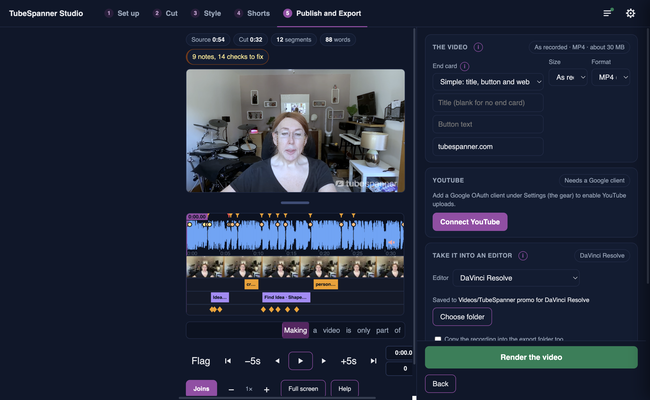
TubeSpanner Studio's Publish and Export page with the panel for handing the edit to DaVinci Resolve

Heading
What the export carries

Bullets Multi
The cut, frame accurate, as separate clips on the timeline so every join can be nudged.
The framing, as keyframes, so the pushes and punches are editable rather than baked in.
The graphics, as ProRes 4444 movies with transparency: cards, lower thirds, callouts and the end card.
The B-roll, on its own track above the footage, with the licence for every stock clip.
The media, gathered into one folder so the project relinks on another machine.
The captions, as a subtitle file.

Heading
Built for DaVinci Resolve first

Body

The export is an FCP7 XML timeline, the format Resolve imports most reliably, and it has been checked in Resolve with the zooms, the B-roll and the animated graphics all arriving in place. Import it from File, Import, Timeline, or drag it into the media pool.

An FCPXML and an EDL are written alongside it for other editors, and the folder has a README that explains what each file is.

Note

Image
Note

Title
Your editor keeps working the way they work

Body

Nothing about the export locks anyone into Studio. It is a normal timeline made of normal media, so it can be pulled apart, rebuilt or ignored.

Title
Hand over a head start
Body

Do the rough cut in Studio and let your editor finish it.