
Desktop app for Mac and Windows
TubeSpanner Studio Beta
Record your video once. Studio reads the script you wrote in TubeSpanner, cuts the retakes, the stumbles and the dead air, then adds captions, cards, B-roll and music. Your footage never leaves your machine.
Version 2.2.29, 26 September 2026. Part of the TubeSpanner plans that include the video editor. See plans
Not sure which Mac you have? Apple menu, About This Mac. A chip named Apple M-something is Apple silicon, an Intel processor is Intel.
Where it fits
-
1
Write the script in TubeSpanner
The script you already plan your video with is the one Studio edits to. Sections become the shape of the cut.
-
2
Record it in one go
Fluff a line and say it again. Studio keeps the take you meant and drops the one you did not, so you can record without stopping.
-
3
Open it in Studio
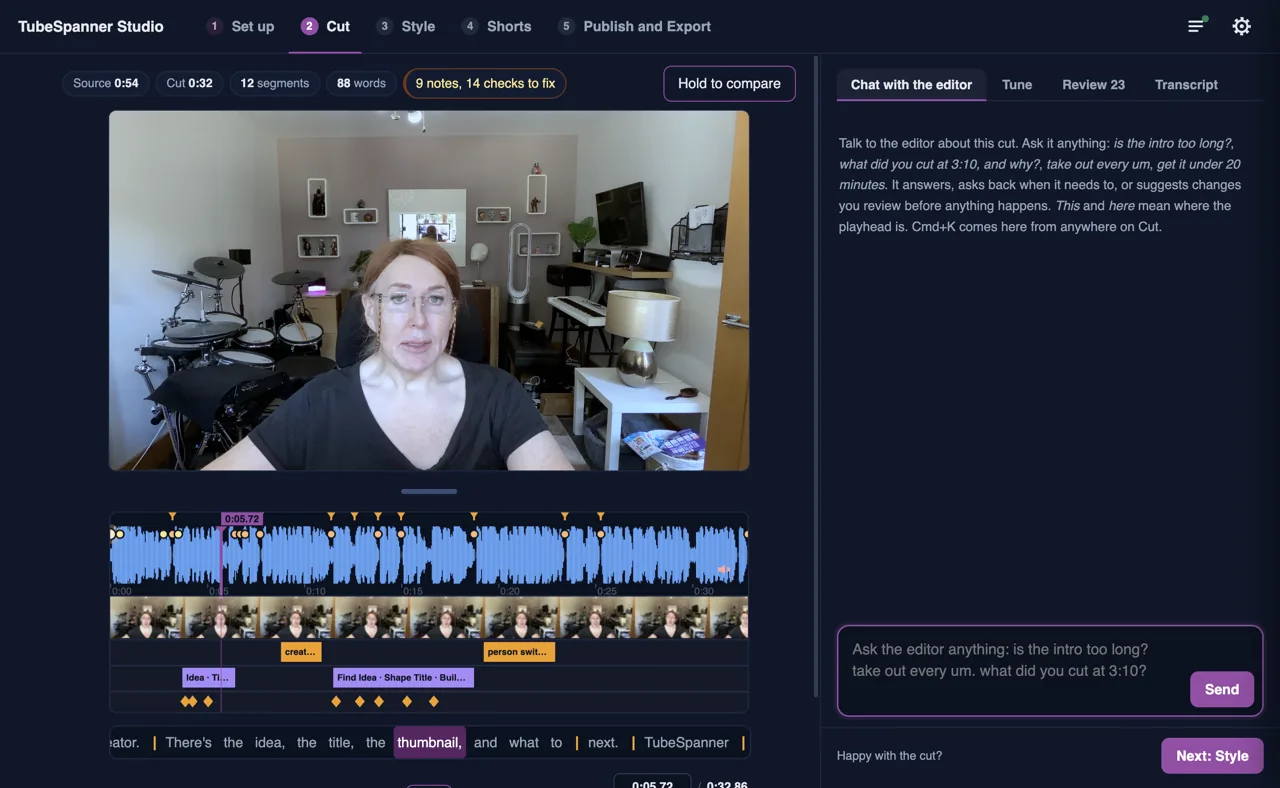
The first pass arrives cut. You watch it through, fix anything you flag, then render it or hand it to your editor.
Keeping the you in YouTube
An automatic edit can sand a video down until every creator sounds the same. Studio is built the other way round. Creator first is how it starts: your performance is the truth and the script is the guide, so it takes out the fluffed line and the dead air and leaves the aside that landed, the laugh, and the way you actually talk.
People subscribe to you, not to a tidy transcript.
What Studio does
It edits to your script
Studio knows what you meant to say, so it can tell a retake from the real take and a tangent from the point.
How the cut is decidedYou fix what it missed, fast
Flag a moment while you watch. Studio brings your notes back one at a time, suggests the smallest fix, and you accept it with one click.
How the notes get fixedCaptions, cards and your brand
Burned-in captions, section cards, callouts, lower thirds, a music bed and colour, all in your brand kit.
The Style stepShorts from the same recording
Studio finds the moments worth clipping, frames them upright around you, and writes the opening line.
How Shorts are cutHand it to a real editor
Export a timeline for DaVinci Resolve with the cut, the framing, the graphics and the B-roll in place, rather than a folder of clips.
What the export carriesIt runs on your machine
Transcription, cutting and rendering all happen locally. There is nothing to upload and nothing to wait in a queue for.
Where your footage goesDownloads
-
Mac, Apple silicon TubeSpanner-Studio-mac-arm64-2.2.29.dmg, 130 MBDownload
9df984d51e06226d… -
Mac, Intel TubeSpanner-Studio-mac-x64-2.2.29.dmg, 138 MBDownload
8a9f93c5fa0d42ef… -
Windows TubeSpanner-Studio-win-x64-2.2.29.exe, 114 MBDownload
0935b3149086adbb…Signed by AGILE451 LTD. The certificate is new, so for now Windows may still show “Windows protected your PC”. Choose More info, then Run anyway. -
Linux, AppImage Being built for this releaseComing soon
What is in 2.2.29
Good to know
- What you need
- A Mac on macOS 13 or later, Apple silicon or Intel. Windows 10 or 11, 64-bit. Linux, 64-bit, as an AppImage.
- The first run
- Studio downloads its speech model once, about 1.6 GB. After that it transcribes without the internet.
- Your account
- Sign in with the TubeSpanner account you already have. Studio reads your scripts and projects, and saves the shot list of each edit back to the project. Editing needs a plan that includes the video editor: anyone can install Studio, and it will tell you if your plan does not cover it.
- From the script editor
- Edit in TubeSpanner Studio opens the app with that script ready to record against.
- Updates
- Studio updates itself when a new version is released.
Edit your next video the day you record it
Studio turns the recording you just made into a cut you can watch, while the take is still fresh.
Download for Mac, Apple silicon