
TubeSpanner Studio

The edit is done before you leave the chair

Studio is the TubeSpanner desktop editor. It takes the recording you have just made, reads it against the script you wrote in TubeSpanner, and hands back a cut with the retakes, the stumbles and the dead air already gone.

Captions, section cards, B-roll and music come next, and the finished video goes straight to YouTube or across to your editor as a timeline. Your footage stays on your own machine the whole way through.

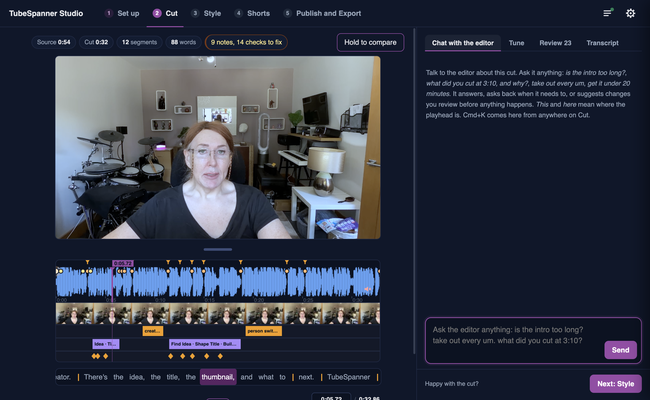
TubeSpanner Studio's Cut page playing a recording, with the waveform and timeline below and a panel for talking to the editor beside it

Heading
Recording and editing stopped being two jobs

Body

The slow part of making a video was never the recording. It is what comes after: scrubbing back through an hour of footage to find the take where you finally got the line right, then trimming the gaps between every sentence.

Studio already knows what you meant to say, because you wrote it in TubeSpanner. That one fact changes the job. It can tell a fluffed line from the real one, a tangent from the point you planned to make, and a thinking pause from a finished sentence. The first pass arrives cut, and you spend your time judging it instead of assembling it.

Heading
Keeping the you in YouTube

Body

An automatic edit can sand a video down until every creator sounds the same. Studio starts from the opposite assumption. Creator first is how it works by default: your performance is the truth and the script is the guide.

So it takes out the fluffed line, the run-up and the dead air, and it leaves the aside that landed, the laugh, the pause you used for effect and the way you actually talk. Go off script and say something better than you planned, and it stays in, with a note to tell you it was kept.

People subscribe to you, not to a tidy transcript.

Heading
What comes back

Bullets Multi
A cut that follows your script. Retakes, filler and the run-ups to a sentence are gone, and whole sentences are kept or dropped, never spliced mid-thought.
Captions burned in, in your style. Classic two-line subtitles or word-by-word pop captions, in your brand colours.
Section cards and lower thirds built from the headings in your script.
B-roll over the right lines, from your own footage folder or from stock.
A music bed that ducks under your voice and lifts between sentences.
Shorts cut from the same recording, framed upright around you.
Comparison table

The afternoon after a recording

Before With Studio
Scrub the whole take looking for the good version of a line The good version is already the one in the cut
Trim the pause after every sentence by hand Pauses are trimmed to the pace you choose
Build the same captions and cards for every video They are built from your script and your brand kit
Cut Shorts separately, from scratch Shorts come out of the same recording
Upload the footage and wait for a queue Everything renders on your own machine

Heading
Five steps, in the order you would do them anyway

Body

Set up is where you choose the recording and the script. Cut is the first pass: you watch what the editor decided, flag anything wrong as it plays, and fix it. Style is captions, cards, colour, music and graphics. Shorts cuts the upright clips. Publish and Export renders the video, sends it to YouTube, or writes a timeline for your editor.

You can stop after Cut and take the video away. Everything after that is polish.

Note

Image
Note

Title
Your recording never leaves your machine

Body

Transcription, cutting and rendering all happen on your own computer. The script and the transcript go to TubeSpanner so the edit can be planned against what you wrote, and the video file itself never does.

Title
Edit your next video the day you record it
Body

Studio runs on Mac, Windows and Linux, and is part of the TubeSpanner plans that include the video editor.