Script-Aware Editing

An editor that has read your script

Most editing tools look at your footage and guess. They can find a silence, and some can find a filler word, but none of them know what the video was supposed to say.

Studio does, because the script came from TubeSpanner. Knowing the intended words is what lets it tell a retake from the real take, and a tangent from the point.

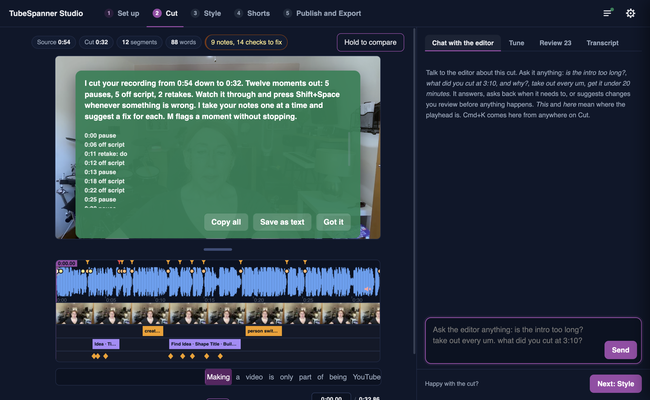
TubeSpanner Studio's Cut page showing the editor's summary: a recording cut from 0:54 to 0:32, with its pauses, off-script moments and retakes listed

Heading
What it takes out

Body

Retakes. Say a line badly, stop, and say it again. Studio keeps the take you meant, which is almost always the last one, and drops the rest.

Run-ups and false starts. The half sentence before you found the thought.

Filler. The ums, and the production chatter that is obviously not part of the video.

Tangents. Whole sentences that match nothing in your script, when you asked for a cut that follows it.

Dead air. The pause where you were reading the next line, trimmed to the pace you pick.

Heading
Sentences, never half a thought

Body

The unit of editing is the sentence. A sentence is kept whole or dropped whole, and a cut inside one only happens for a genuine retake or a run of filler. That rule is why the result sounds like you talking rather than like a video that has been chopped.

Cuts land in the silence either side of the words, measured from the sound itself rather than from a transcript timestamp, so nothing is ever clipped mid-word.

Heading
Creator first, by default

Body

Knowing the script could be used to force a video to match it word for word. Studio does not start there, because the take where you went slightly off script is often the best thing in the video.

Creator first is the default stance: your performance is the truth and the script is the guide. Studio drops the fluffs, the run-ups and the production chatter, keeps what you actually said, and hands you back a script as recorded so your written version can catch up with the good version.

Script first is there when the running time matters more than the ad libs. The cut follows the written script closely, in whole sentences.

Note

Image
Note

Title
Keeping the you in YouTube

Body

An automatic edit can sand a video down until every creator sounds the same. This one is built to cut the mistakes and leave the person: the aside that landed, the laugh, the pause you used for effect. People subscribe to you, not to a tidy transcript.

Heading
Talk to the editor while you record

Body

You can leave instructions in the recording itself, the way a presenter drops notes for a human editor. Say Editor, and then what you want.

Editor, cut that throws away the sentence you just fluffed. Editor, section starts a new part of the video and anchors a card. Editor, note leaves a message that shows up in the edit. Editor, that is a wrap ends the video there. The cues are cut out of the finished video, and the teleprompter in the TubeSpanner script editor keeps them in front of you while you read.

Tip

Image
Tip

Title
Say the line again and keep going

Body

The cue that saves the most time is the one you do not have to say. Fluff a line, pause for a beat, and say it properly. Studio will work out which one you meant.

Title
See it on your own footage
Body

The first pass takes a few minutes on a recording you already have.