
Refine Your Cut

Flag it while you watch, fix it in a click

No automatic edit is perfect on a first pass, and the job of checking one is usually worse than the job of making it: you spot something at four minutes in, and then you have to find it again.

Refine is the step that removes that. You watch the cut through and tap a key when something is wrong. Afterwards your notes are waiting, each with a fix already worked out.

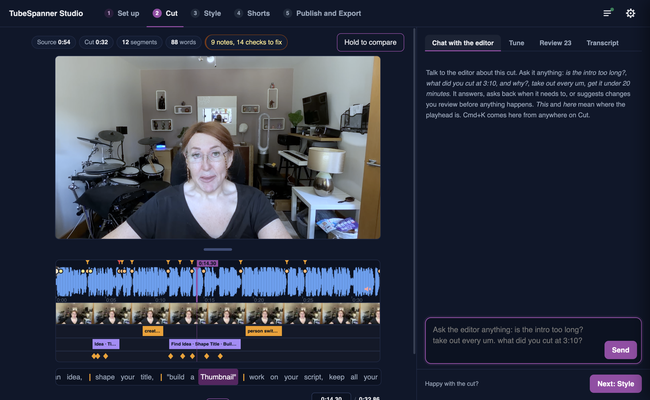
TubeSpanner Studio's Cut page with the chat panel open beside the timeline, for asking the editor to change the cut

Heading
Watching is the only job

Body

This all happens on the Cut step, where the first pass lands. The right of the window carries two tabs, Tune for the cut itself and Notes for what you flagged, so checking and fixing are the same place rather than a trip to another screen.

Press play and watch. Space pauses and asks what is wrong, in a sentence. M marks the moment and keeps playing, for when you would rather not stop.

A note remembers the instant in the recording and the word being said, so it still points at the right moment after the cut changes around it.
Heading
One note at a time, with the fix ready

Body

Each note goes to TubeSpanner with the words either side of it, and comes back with the smallest change that would fix it: the words to drop, or the words to bring back.

You hear the passage as it is, then hear it with the fix, then accept it. The suggested cut is shaded on the waveform and struck through in the words, so you can see what is about to happen before it does. Apply makes the change and moves you to the next note.

Heading
What else it catches

Bullets Multi
Joins that land on speech. Where two kept pieces meet on a word rather than in a pause, Studio raises it as a check of its own, alongside your notes.
A cover for an awkward join. One button lays B-roll across it, with the sound running on underneath so the picture never cuts back to you on the join itself.
Fixes by hand. Anything you would rather do yourself opens the Tune tab with the passage already selected.
Notes for later steps. A note about a caption or a graphic sends you to Style instead of changing the cut.

Note

Image
Note

Title
Everything is reversible

Body

Applying a fix is the same as making the cut by hand, so undo takes it back. Your notes and the state of the edit save to the project as you work.

Title
Stop hunting for the thing you noticed
Body

It is part of Studio, on Mac, Windows and Linux.