
Video Editing That Runs On Your Machine

No uploads, no queue, no waiting room

Cloud editors need your footage before they can do anything. For a ten minute 4K recording that is an upload measured in gigabytes, then a queue, then a download.

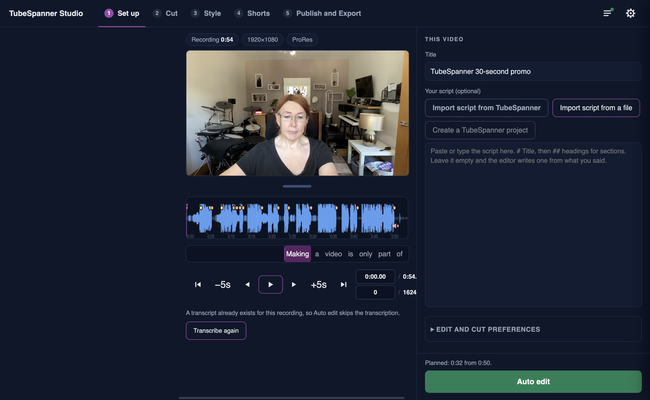
Studio is an app on your computer. It reads the file where it already is.

TubeSpanner Studio's Set up page with a local ProRes recording loaded and a script panel beside it

Heading
Where the work happens

Body

Transcription runs on your machine, using a speech model Studio downloads once, about 1.6 GB. On an Apple silicon Mac it listens to a minute of audio in a few seconds. Cutting, previewing and rendering are local too, using a video engine bundled with the app.

What does go to TubeSpanner is the transcript and your script, so the edit can be planned against what you meant to say, and the shot list of the finished edit, so it is saved with your project. The video file stays where it is.

Heading
What that buys you

Bullets Multi
No upload. Work starts the moment you choose the file.
No queue. Nothing is waiting behind anybody else's render.
No storage bill and no second copy of your footage on somebody's server.
It works on a bad connection, and transcription works with none at all after the first run.
Client and confidential footage never leaves the building.
Comparison table

Two ways to edit a ten minute recording

A cloud editor Studio
Upload several gigabytes first Reads the file where it already is
Wait in a rendering queue Renders on your own machine
Your footage is stored on a server Your footage stays on your computer
Needs a good connection throughout Needs one to plan the edit, not to do it

Note

Image
Note

Title
What you need

Body

A Mac on macOS 13 or later, Apple silicon or Intel. Windows 10 or 11, 64-bit. Linux, 64-bit, as an AppImage.

Title
Keep your footage where it is
Body

Studio is part of the TubeSpanner plans that include the video editor.