
TubeSpanner Editor

Your first cut, made for you

TubeSpanner Editor is an app for editing your videos on your own computer. Open a recording and Auto edit hands back a first cut, with the retakes, slips and long pauses already gone.

You then watch it through and make the final choices. Add captions, section cards, B-roll and music. When you're happy, render the video, upload it to YouTube as private, or send it to your editor as a timeline.

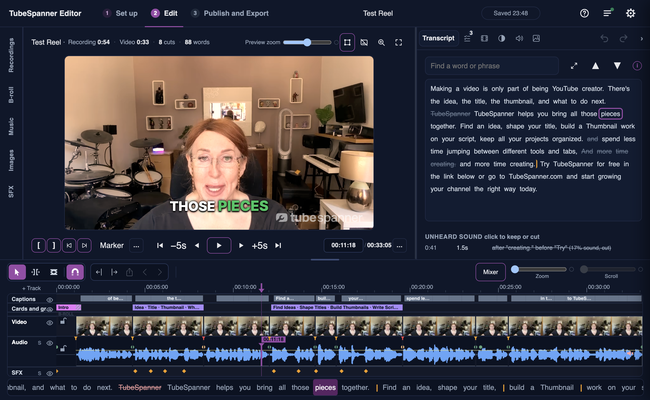
The Edit page of TubeSpanner Editor: a creator talking to camera in a home studio with the caption "THOSE PIECES" on the picture, the transcript beside her with cut words struck through, and the cut laid out on the timeline below.

Heading
Getting started

Body

You don't need a YouTube channel or a script. Sign in, open a video file or record one, then press Auto edit. If you wrote a script in TubeSpanner, you can link it, and if you didn't, Auto edit works from what you said. Prefer to do it all yourself? Press Edit it myself instead.

Plans. TubeSpanner Editor comes with TubeSpanner Pro and above, and with the 14-day free trial you get when you sign up. When a trial ends without Pro, the editor shows the plans, and anything you made stays on your computer.

Which videos. Auto edit is ready for talking-head and reaction videos. Other kinds are still in beta.

Heading
Three steps

Body

Set up is where you choose the recording, and the script if you have one.

Edit is where you watch the cut and fix it. Press M to drop a marker and keep watching, or Shift and Space to pause and say what is wrong. Transcript shows every word, and Review shows what was done and anything worth a second look.

Publish and Export renders the video, uploads it to YouTube as private, or writes a timeline for your editor.

Heading
What you can add

Bullets Multi
Captions, as classic subtitles or word-by-word pop captions. Drag them anywhere in the frame.
Section cards, lower thirds and callouts, matched to your brand kit.
B-roll, from your own folder or from stock. Auto edit adds none to reaction videos or tutorials, because your screen and clips do that job.
Music, colour and your logo, as a watermark in the corner you choose.
Clean audio, which evens out your voice and lowers room echo.

Heading
Questions people ask first

Body

How do I fix a spelling mistake in the captions? Open Transcript and double-click the word. Press Enter to change that one, or Shift and Enter to change every word spelt the same. You can also pause and double-click the caption on the picture, or right-click it on the timeline and choose Fix these words to find it in Transcript.

How do I change a B-roll clip or photo I don't like? Right-click it on the timeline and choose Leave this B-roll out. Then open B-roll, add your own clip under Yours and drag it onto the timeline. To turn all B-roll off, use the B-roll switch in Graphics.

How do I make my video shorter? Open Transcript. Click the first word, Shift-click the last, then press Cut. Anything you cut stays struck through, so you can click it and choose Bring back.

Note

Image
Note

Title
It runs on your computer

Body

Your video file is never uploaded. Transcribing, cutting and rendering all happen on your computer. Your transcript and script go to TubeSpanner so the edit can be planned.

A few things use the internet. If you switch on Clean audio, your voice goes through Auphonic. Stock B-roll is downloaded. TubeSpanner Editor also checks your plan at least once every 7 days.

Heading
Working with a video editor

Body

Choose DaVinci Resolve and TubeSpanner Editor writes a folder for it: the timeline, the B-roll, music and graphics, and the captions as text you can edit. Your recording stays where it is, unless you tick Copy the recording into the export folder too. For anything else, an EDL carries the cut only.

Heading
What you need

Body

A Mac on macOS 13 or later, Apple silicon or Intel, or Windows 10 or 11, 64-bit. Linux is coming soon. Memory: 8 GB minimum, 16 GB recommended for 4K.

The first time you use it, the app downloads its speech model: about 140 MB on every computer, and a larger one of about 1.6 GB where your computer is fast enough to use it.

Title
Edit your next video the day you record it.
Body

TubeSpanner Editor runs on Mac and Windows, and comes with TubeSpanner Pro and above, and with the free trial.